In short
A cohort is built in the order of its screen: the level of a row, then the criteria — nine types, from age to free text —, assembled into groups with AND, OR and NOT. Materialize then freezes the membership list, and the definition is exchanged in OHDSI ATLAS format.
A cohort is created from the project’s Cohorts page. It opens on the builder, which this page walks through from the toolbar to the criteria, then to how they combine.
The builder screen
A cohort opens on two panes. On the left, the Criteria — or, through the Criteria / SQL toggle, the query they produce. On the right, the results of the last run. The two eye icons at either end of the toolbar fold one pane or the other, to give the full width to what remains.
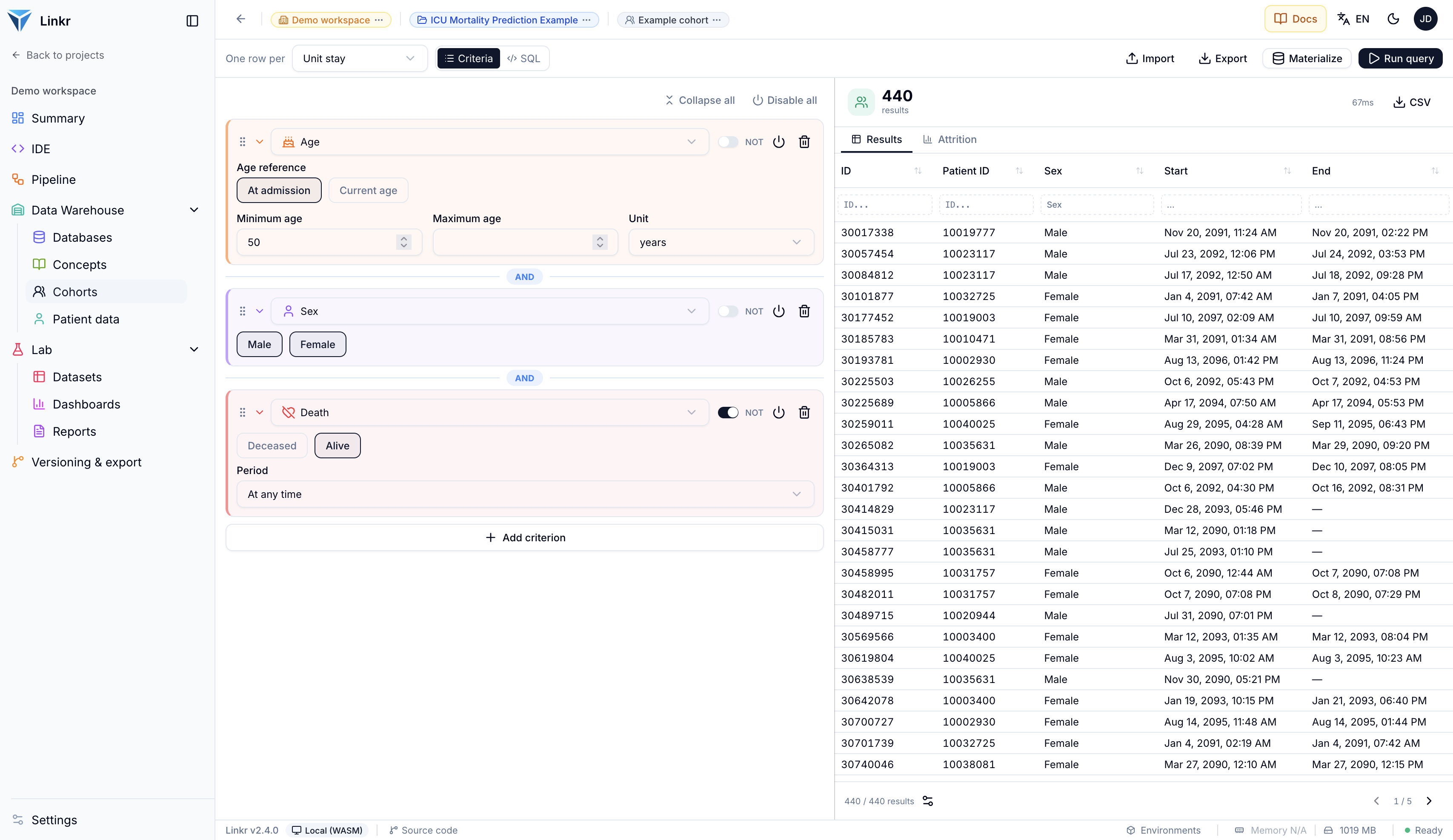
The toolbar also carries Import and Export (in ATLAS format, see below), Report, Materialize and Run query.
One row per what?
Before the criteria, a question to settle in the toolbar: One row per what?
| Level | What a row represents |
|---|---|
| Patient | One person, however many times they came in. |
| Hospitalization | One hospital stay. The same patient may appear several times. |
| Unit stay | One stay in a unit — an ICU stay within a hospitalization. |
The choice follows from the question. “How many patients received norepinephrine?” is counted at patient level; “what is the median ICU length of stay?” at unit-stay level.
This choice can be changed at any time
The level changes without losing your criteria. It is worth comparing: a cohort of 800 patients may correspond to 1,200 hospitalizations, and the gap is often instructive.
The criteria
Add criterion offers nine types — and, under Logic, Add group (AND/OR).
Age
A minimum, a maximum, in years, months or days — current age or age at admission.
Sex
Male, female, unknown.
Death
Deceased or alive, during hospitalization, during the unit stay, or at any time.
Time period
A date window.
Length of stay
In hours, days or months, at hospitalization or unit-stay level.
Care location
One or several units.
Concept
A diagnosis, a drug, a test. The most used — see below.
Free text
A search through clinical notes.
Identifier list
Patients, hospitalizations or unit stays named one by one — a column pasted from a spreadsheet.
A criterion expands to be set, and collapses to a one-line summary — At admission ≥ 18 years. Its type is changed from the menu at the top of the expanded criterion.
At the cohort extraction level (patient, hospitalization, or unit stay)
3 identifiers
The Concept criterion
You pick the event table — diagnoses, prescriptions, lab results — then, with Select concepts, the concepts involved. Two refinements are available, each in a collapsible section:
- a value filter: creatinine, but only above 200 µmol/L. Several filters can be stacked, and the between operator bounds both sides;
- an occurrence count: at least three measurements, not just one.
Occurrences are counted at the cohort’s level. On a patient-level cohort, “at least 3” means three times for that patient, across all stays.
On a hospitalization or unit stay cohort, only events dated during that stay, between admission and discharge, count. “Stays with a lactate above 2” keeps the stays where the lactate was measured, not every stay of a patient who once had one. To ask “at any time”, use the patient level. When an event table has no date in the schema mapping, the criterion cannot be limited to the stay and the form says so.
The Free text criterion
For what structured data does not carry: a mention in a report.
- Name — what the search stands for, anticoagulants; it replaces the terms on the collapsed criterion.
- The field — the Note body or the Note title.
- The mode — Contains (a substring: “art” also finds “artery”), Whole word (“art” finds only “art”) or Regular expression (
hepar|lovenox). - Aa and é=e — by default, case and accents are ignored: “hemorragie” finds “hémorragie”. These two buttons make them count.
- The terms — separated by commas. With several, Any term matches or All terms must appear.
Add another field chains a second search, with AND or OR — on the title and the body, say — and all of them apply to the same note. NOT, at the head of a search, excludes the notes that match it. The Note at the bottom of the form is not used in the query: it is there to explain the criterion.
Whole word avoids false positives
Searching Contains “sepsis” also returns “asepsis”. Whole word mode removes that noise, which is the leading cause of an over-broad cohort.
This criterion requires mapped clinical notes
If no note table is declared in the database’s schema, the search cannot run: the criterion stays on screen, descriptively, but filters nothing. See Schemas.
The Identifier list criterion
For when the population is already known, patient by patient: a list drawn from a registry, the charts a colleague reviewed. Identifiers of sets what the numbers designate — Patient, Hospitalization or Unit stay — and the Identifiers box takes a column pasted from a spreadsheet, or a list separated by commas, spaces or line breaks. The counter under the box says how many identifiers were recognised.
Combined with other criteria it narrows as well as it excludes: with NOT, it removes a list of patients — those who objected to the use of their data, for instance.
An age in days or months needs a birth date
The Age criterion accepts years, months and days — useful in neonatology. When the database’s schema carries only a birth year, an age in days or months cannot be computed: the form says so, and the criterion would match no one.
Combining: AND, OR, NOT
Criteria assemble into groups, and groups nest. That is what lets you express a real definition:
age ≥ 18 AND (sepsis OR septic shock) AND NOT deceased
385
results
Each criterion — and each group — carries its controls:
- AND / OR, the pill between two items, deciding how one joins the previous. A click toggles it;
- NOT, which inverts it — this is how an exclusion criterion is written;
- Enable / Disable, the power icon, which neutralizes it without deleting it;
- the handle on the left, which moves it by drag and drop.
A group is named with the pencil — that name is the one the attrition shows. At the top of the panel, Collapse all and Disable all act on the whole tree at once.
Within a group, AND binds tighter than OR, as in SQL: A AND B OR C reads (A AND B) OR C. As soon as you mix the two, a group makes the intent explicit, for you and for the reviewer.
Disable rather than delete
This is the gesture to remember when testing a definition: disable a criterion, re-run, compare the count. You measure its real weight without losing its settings — and you can turn it back on afterwards.
Running, reading the attrition and the other result tabs, the SQL query and the cohort report are covered in Results, SQL and report.
Freezing a cohort
Materialize records the membership list at a point in time. The toolbar then shows Frozen with its date; hovering it recalls how many members were frozen.
The distinction from running is important:
Run query
A preview, recomputed each time.
Used to work out the definition. If the database changes, the count changes.
Materialize
A frozen list, kept.
This is the list the Patient data page reads. It does not move until you regenerate it.
The point is reproducibility. A hospital warehouse updates continuously: without a snapshot, two analyses run a month apart do not cover the same patients, and your figures become impossible to recover. Freezing the cohort fixes the denominator.
Regenerating asks for confirmation — Re-materialize cohort — noting that the counts may differ if the source has changed.
Exchanging with OHDSI ATLAS
A definition imports and exports in OHDSI ATLAS’s JSON format. A definition published by a research network can therefore be re-run against your database, and yours can go to a partner who does not use Linkr. On import, Linkr reports how many criteria it detected and any warnings — what ATLAS expresses and Linkr cannot translate.
Cohorts travel with the project
A cohort is part of the export: its criteria leave with the project, in a readable, versionable file. Run results stay local — they depend on the database, not on the definition.
Going further
- Results, SQL and report — running, reading attrition, editing the SQL, producing the report.
- Cohorts — what a cohort is, and what it feeds.
- Concepts — finding the concepts to put in a criterion.
- Schemas — what the mapping must declare for criteria to work.
- Designing a study — writing defensible inclusion criteria.