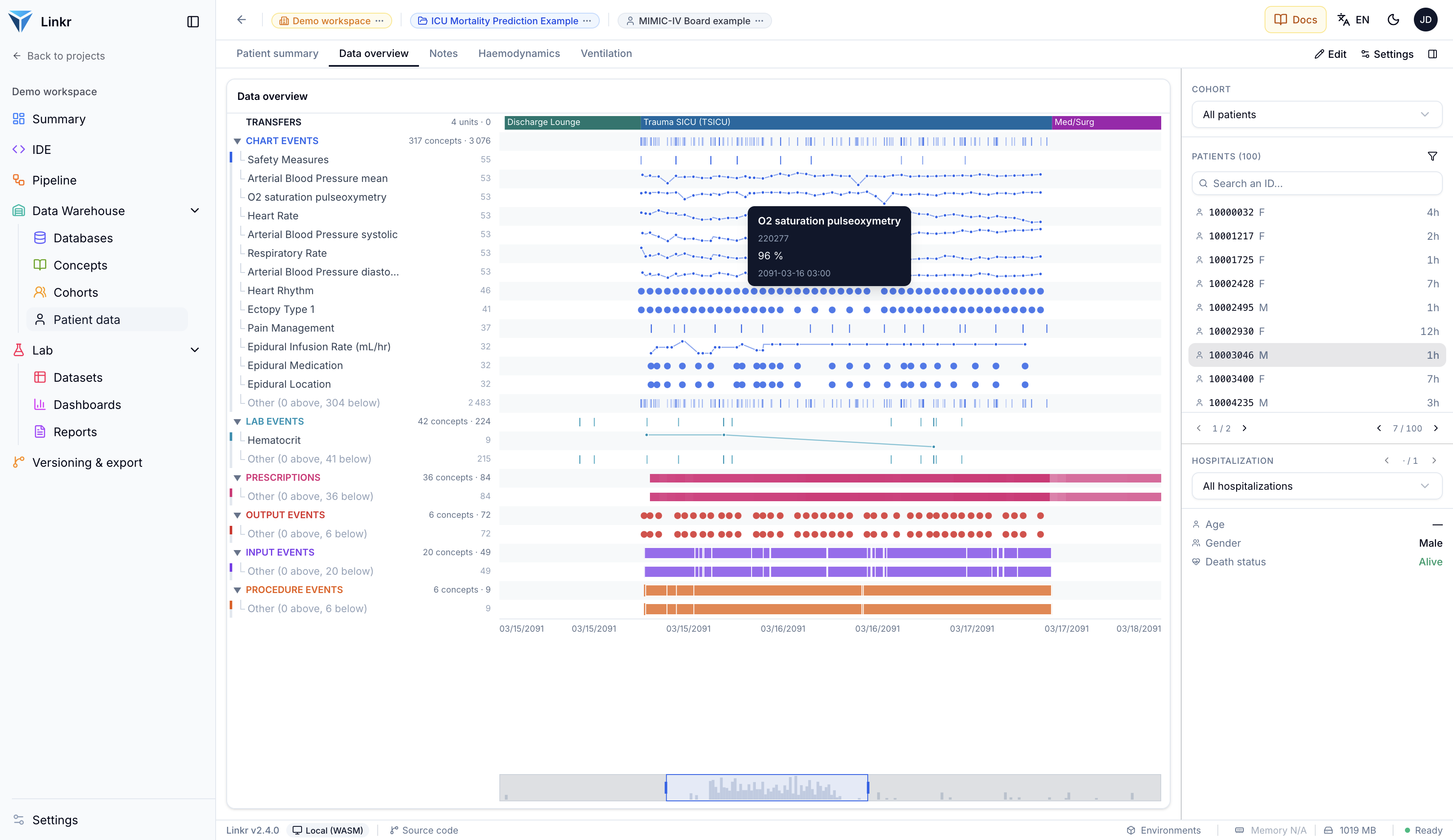
In a nutshell
The MIMIC (Medical Information Mart for Intensive Care) database is one of the most widely used intensive care databases in the world. Publicly accessible upon completion of an ethics training and with a justified research purpose, it contains data from over 50,000 patients admitted to intensive care. It is an excellent learning ground for working with data from clinical data warehouses.
What is MIMIC?
The MIMIC database is a North American database containing data from over 50,000 patients admitted to intensive care at the Beth Israel Deaconess Medical Center (Boston, USA). It is developed and maintained by the MIT Lab for Computational Physiology.
It is one of the most widely used intensive care databases in the scientific literature, thanks to its public access and the richness of its data: demographics, diagnoses, lab results, medication prescriptions, clinical notes, physiological signals, and more.
A learning tool
Despite imperfect data quality (missing data, entry errors, selection bias), MIMIC is an excellent foundation for learning to work with data from clinical data warehouses (CDWs). Many online courses and tutorials use it as their primary dataset.
Available versions
MIMIC comes in several versions:
- MIMIC-III (2016): data from 2001 to 2012, approximately 46,000 patients, MIMIC-specific data schema.
- MIMIC-IV (2023): most recent version. Data from 2008 to 2019, approximately 65,000 patients, modernized schema.
Both versions can be converted to the OMOP CDM format using open source ETLs: MIT-LCP/mimic-omop for MIMIC-III, OHDSI/MIMIC for MIMIC-IV. A demo database of MIMIC-IV OMOP with 100 patients is freely available (see below).
Which version to choose?
If you’re just starting out, go with MIMIC-IV OMOP Demo: you’ll learn both clinical data manipulation and the OMOP standard, which is increasingly used in research. We offer interactive tutorials to query this database directly in your browser: beginner and intermediate. To work with the full dataset in OMOP format, you’ll need to run the ETL yourself.
Demo databases (open access)
Demo databases are publicly available. They contain anonymized data from 100 patients and require no registration.
You can download them directly:
- MIMIC-III Demo — MIMIC data schema
- MIMIC-IV OMOP Demo — OMOP CDM v5.4 data schema
These demo databases are ideal for discovering the data structure and practicing SQL queries before accessing the full data.
Accessing the full data
To access the full databases, you need to complete a few steps.
Create a PhysioNet account
Register on physionet.org. You will need an institutional email address.
Submit a credentialing request
Fill out the credentialing form on PhysioNet. You will need to provide your information and the contact details of a supervisor or colleague, who will receive a verification email.
Complete the CITI Course
This is a mandatory online training on research ethics and data protection. The steps are detailed on the PhysioNet website.
Submit your certificate
Once the training is complete, download your CITI certificate and submit it on PhysioNet for validation by the team.
Sign the Data Use Agreement
Final step: sign the Data Use Agreement (DUA) for the MIMIC project. You will then have access to download the data.
Useful links:
- PhysioNet registration
- Credentialing request
- CITI Course instructions
- Certificate submission
- MIMIC-IV page
Downloading the files
Once access is granted, the Files section at the bottom of the MIMIC-IV page lets you download the files from your browser. You can also fetch everything at once with the wget command shown on that same page: open a terminal (the Terminal app on Mac), replace YOUR_USERNAME with your PhysioNet username, then type your password when prompted.
cd ~/Downloads
wget -r -N -c -np --user YOUR_USERNAME --ask-password https://physionet.org/files/mimiciv/3.1/
On Mac, wget is not installed by default: install it with Homebrew (brew install wget), or download the files from your browser.
wget is not available on Windows: download the files from the Files section of the MIMIC-IV page into your Downloads folder, keeping the hosp and icu folders.
The downloaded files (about 8 GB) are compressed CSVs, stored in the hosp/ and icu/ folders. With wget, they end up in physionet.org/files/mimiciv/3.1/.
Database structure
Native MIMIC schema
The native MIMIC-IV schema is organized around several modules:
- hosp: hospital data (admissions, diagnoses, prescriptions, lab results)
- icu: intensive care-specific data (physiological measurements, severity scores, inputs/outputs)
- ed: emergency department data
- note: free-text clinical notes
Key tables include patients, admissions, diagnoses_icd, labevents, prescriptions, chartevents, and more.
Full documentation
The official MIMIC-IV schema documentation is available online. Each table is described in detail with its columns and relationships.
OMOP schema
The OMOP version of MIMIC-IV follows the OMOP CDM v5.4 standard. The data is reorganized into standardized tables: person, visit_occurrence, condition_occurrence, measurement, drug_exposure, etc. You can explore the full schema on our interactive explorer.
The advantage of the OMOP format is that you can use the same SQL queries on any database converted to OMOP, whether it’s MIMIC, a French hospital warehouse, or any other compliant database.
Loading MIMIC-IV into Linkr
Once you have downloaded MIMIC-IV, you can explore it in Linkr within minutes, without installing a database server.
Converting the files to Parquet
PhysioNet provides MIMIC-IV as compressed CSV files (.csv.gz): one file per table, stored in the hosp/ and icu/ folders. Linkr reads Parquet files, a column-based storage format that is much more compact and faster to query. The files therefore need to be converted once.
Open a terminal, then copy and paste the block below. If you did not use wget, adapt the first line: the path to the folder that contains hosp/ and icu/.
# Go to the downloaded folder (the one that contains hosp/ and icu/)
cd ~/Downloads/physionet.org/files/mimiciv/3.1

# Install DuckDB, the tool that does the conversion (only once)
curl https://install.duckdb.org | sh

# Convert each table to Parquet, into a new parquet/ folder
for f in hosp/*.csv.gz icu/*.csv.gz; do
  out="parquet/${f%.csv.gz}.parquet"
  mkdir -p "$(dirname "$out")"
  echo "Converting $f"
  ~/.duckdb/cli/latest/duckdb -c "COPY (FROM read_csv('$f', delim = ',', sample_size = -1)) TO '$out'"
done
# Go to the downloaded folder (the one that contains hosp\ and icu\)
cd "$HOME\Downloads\physionet.org\files\mimiciv\3.1"
# Install DuckDB, the tool that does the conversion (only once)
winget install DuckDB.cli --accept-source-agreements --accept-package-agreements
$env:Path = [Environment]::GetEnvironmentVariable("Path", "User") + ";" + [Environment]::GetEnvironmentVariable("Path", "Machine")
# Convert each table to Parquet, into a new parquet\ folder
foreach ($f in Get-ChildItem hosp, icu -Filter *.csv.gz) {
$src = "$($f.Directory.Name)/$($f.Name)"
$out = "parquet/" + ($src -replace '\.csv\.gz$', '.parquet')
New-Item -ItemType Directory -Force -Path (Split-Path $out) | Out-Null
Write-Host "Converting $src"
duckdb -c "COPY (FROM read_csv('$src', delim = ',', sample_size = -1)) TO '$out'"
}You get a parquet/ folder with the same layout: parquet/hosp/admissions.parquet, parquet/icu/icustays.parquet, and so on.
Time and disk space
Converting the full database takes several tens of minutes: the chartevents and labevents tables alone hold several hundred million rows. Plan for about 7 GB of free space for the parquet/ folder.
Creating the database in Linkr
Start Linkr
Install and start Linkr by following the installation guide, then open it in your browser.
Open a workspace
Open an existing workspace, or create one with the New workspace button. Only the name is required.
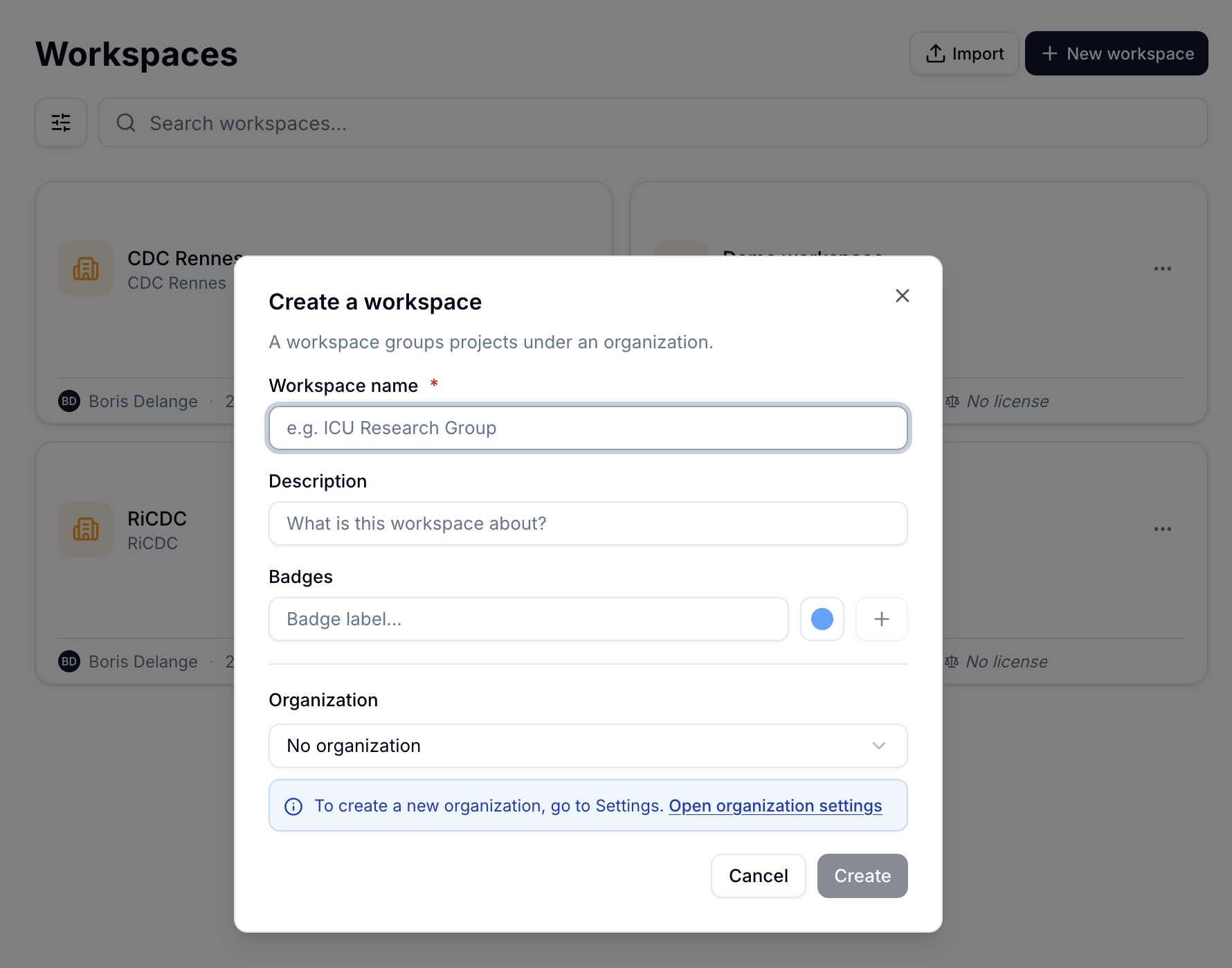
Creating a workspace: only the name is required. Click to enlarge.
Install the MIMIC-IV schema
In the Data Warehouse menu, open Schemas, click Import, then the From the catalog tab, and install MIMIC-IV. The schema describes the database's tables and columns.
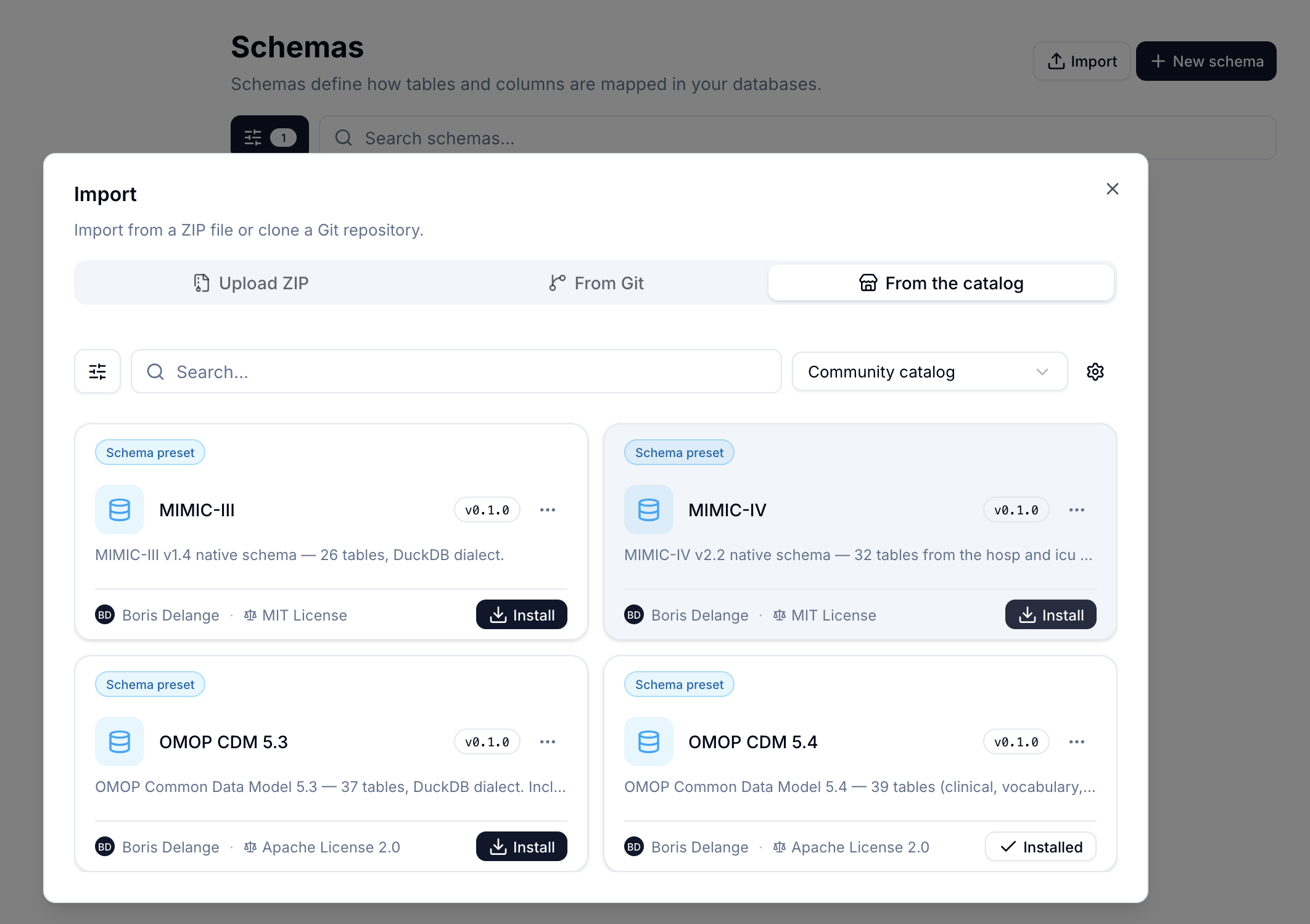
The community catalog offers the MIMIC-III, MIMIC-IV and OMOP schemas. Click to enlarge.
Add the database
In Data Warehouse › Databases, click Add database. Give it a name in the General tab, then in the Connection tab choose the DuckDB engine, the MIMIC-IV schema and the Parquet folder import mode. Finally, select the parquet/ folder created above and click Create.
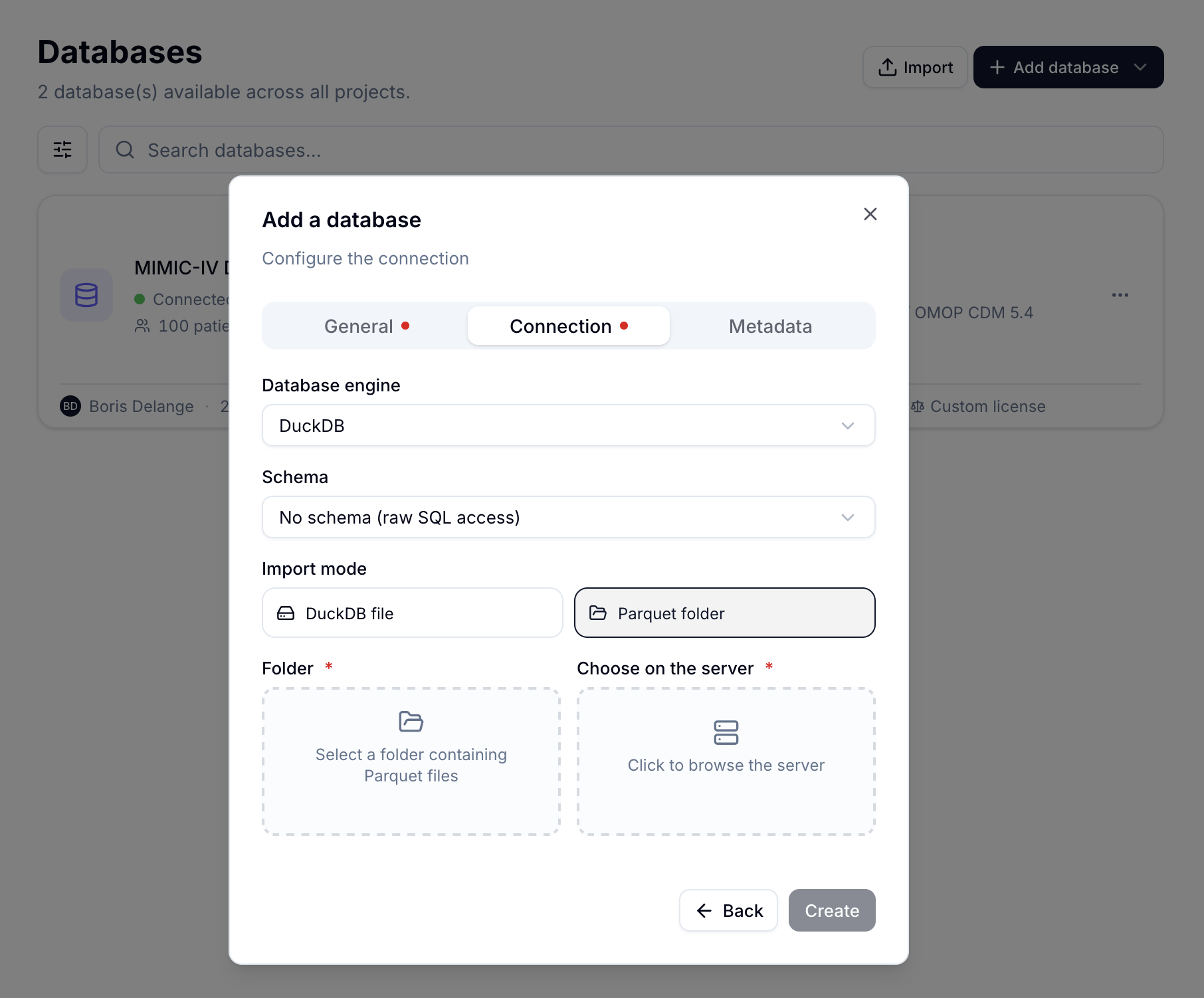
The Connection tab: choose the DuckDB engine, the MIMIC-IV schema in the Schema list, and the Parquet folder mode. If Linkr runs on a server that already holds the files, use Choose on the server instead. Click to enlarge.
Linkr detects the tables automatically: the hosp/ and icu/ subfolders become the hosp and icu SQL schemas, so you can write queries such as SELECT * FROM hosp.admissions. The data stays on your machine or your server: Linkr does not send it anywhere.
The database’s Statistics tab then gives a first overview: number of patients, hospitalizations and unit stays, sex distribution, lengths of stay and admission timeline.
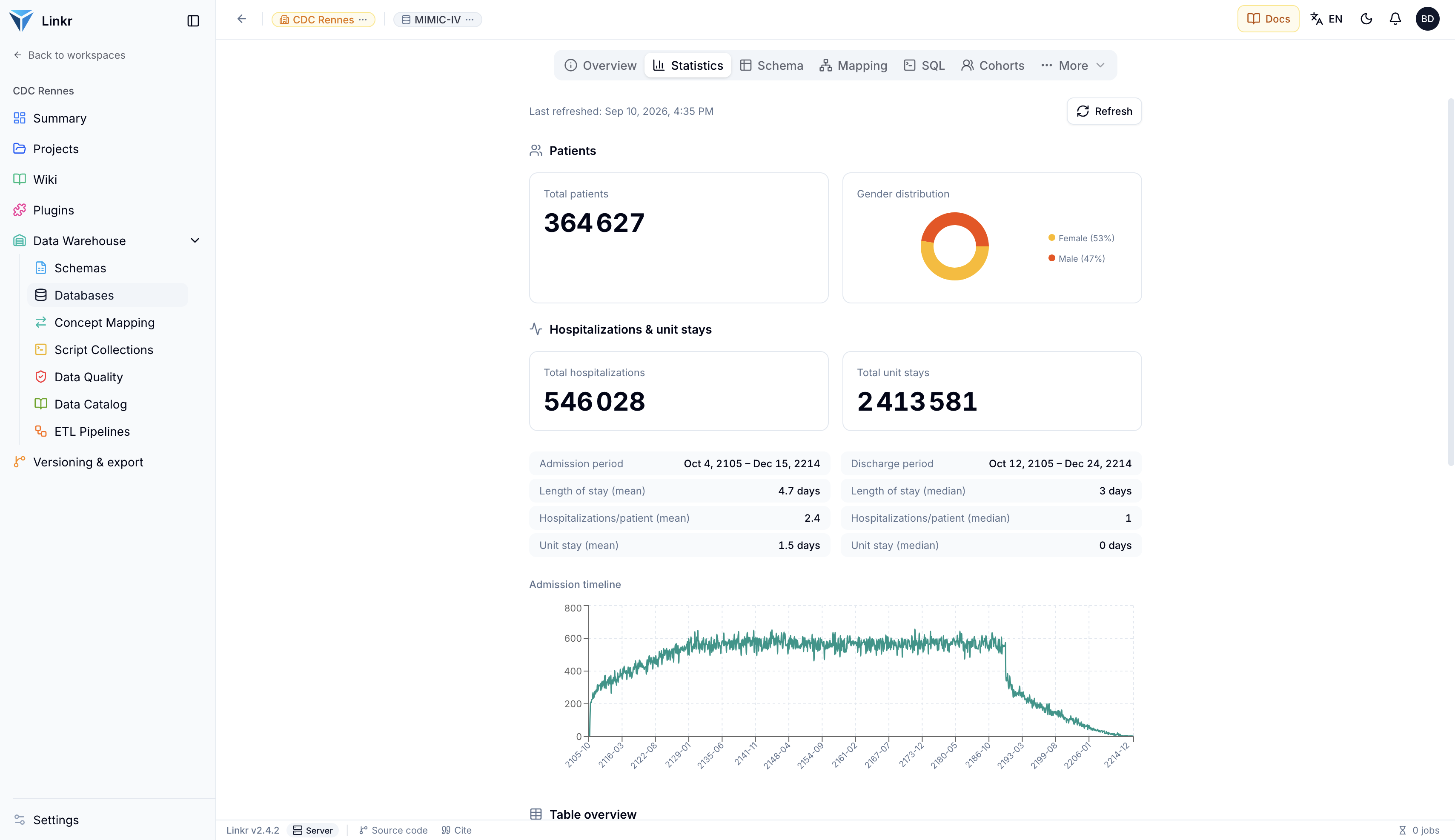
Statistics of the full MIMIC-IV database: 364,627 patients and 546,028 hospitalizations. Dates are shifted into the future (2105 to 2214) to protect anonymity. Click to enlarge.
Once the database is loaded, you can browse the concept dictionary, select cohorts by criteria, and display each patient’s individual record on a timeline. The page Explore a health data warehouse walks through each of these screens, using the MIMIC-IV Demo.
Practice without credentials
The MIMIC-IV Clinical Database Demo contains 100 patients, is openly accessible, and uses exactly the same format. You can run through the whole process with it in a few minutes while your access request is being reviewed.
- MIMIC is a publicly accessible database of over 50,000 ICU patients, ideal for learning.
- Demo databases with 100 patients are immediately accessible, no registration needed.
- Access to the full data requires registration, CITI training, and signing a DUA.
- The MIMIC-IV OMOP Demo lets you learn both clinical data manipulation and the OMOP standard simultaneously.
- Once the files are converted to Parquet, MIMIC-IV loads into Linkr in a few clicks, using the MIMIC-IV schema from the catalog.